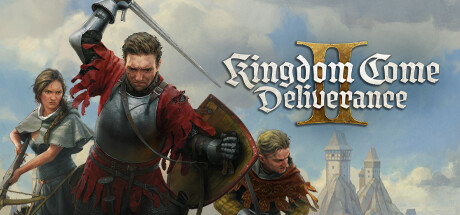
Kingdom Come: Deliverance II Trainer
⬇ Jump to Download
Kingdom Come: Deliverance II (Action, Adventure, RPG) developed by Warhorse Studios: A thrilling story-driven action RPG, with a rich open world, set in 15th century Medieval Europe. Experience the ultimate medieval adventure – through the eyes of young Henry – as you embark on a journey of epic proportions. This v1.1-v1.4+ offline trainer includes God Mode/Ignore Hits, Infinite Health, Infinite Stamina.
Kingdom Come: Deliverance II Trainer Hotkeys & +41 Cheats (v1.1-v1.4+)
Num 1 – God Mode/Ignore Hits
Num 2 – Infinite Health
Num 3 – Infinite Stamina
Num 4 – Infinite Energy
Num 5 – Infinite Nourishment
Num 6 – No Injuries
Num 7 – No Fall Damage
Num 8 – Zero Weight ?
Num 9 – Empty Enemy Stamina ?
Num 0 – Super Damage/One Hit Kills
Num . – Damage Multiplier
Num + – Defense Multiplier
Ctrl+Num 1 – Edit Money ?
Ctrl+Num 2 – Edit Clicked Item Amount ?
Ctrl+Num 3 – Infinite Item Durability & Freshness
Ctrl+Num 4 – Save Without Saviour Schnapps
Ctrl+Num 5 – Set Game Speed
Ctrl+Num 6 – Set Movement Speed
Ctrl+Num 7 – Set Jump Height ?
Ctrl+Num 8 – Freeze Daytime
Ctrl+Num 9 – Time Pass Speed
Alt+Num / – Horse: Infinite Stamina
Alt+Num * – Horse: Infinite Sprint Duration ?
Alt+Num 1 – Infinite Stat Exp ?
Alt+Num 2 – Stat Exp Multiplier
Alt+Num 3 – Infinite Skills & Combat Exp ?
Alt+Num 4 – Skills & Combat Exp Multiplier
Alt+Num 5 – Edit Skill Points ?
Alt+Num 6 – Max Reputation ?
Alt+Num 7 – Reputation Multiplier
Alt+Num 8 – Zero Conspicuousness ?
Alt+Num 9 – Zero Noise ?
Alt+Num 0 – Zero Visibility ?
Alt+Num . – Save Location
Alt+Num + – Teleport to Saved Location
Alt+Num – – Teleport to Checkpoint Location ?
Shift+F2 – Stamina Consumption Rate
Shift+F3 – Energy Drain Rate
Shift+F4 – Nourishment Dain Rate
Shift+F5 – Carried Weight Multiplier ?
Shift+F6 – Always Win Dice Game
How to Install & Use the Kingdom Come: Deliverance II PC Trainer
- Download the Kingdom Come: Deliverance II (v1.1-v1.4+)
.ziparchive from the Download Vault below and extract it to a folder. - Launch Kingdom Come: Deliverance II on PC (Steam / offline mode) and load into single-player gameplay first.
- Run the extracted trainer executable as Administrator and press the hotkeys listed above to toggle cheats in real time.
Safety Notice: Strictly for offline single-player campaigns and sandbox testing — never use in online or PvP multiplayer modes.
Kingdom Come: Deliverance II Trainer FAQ (v1.1-v1.4+)
Which game version does this Kingdom Come: Deliverance II trainer support?
This build is tested for Kingdom Come: Deliverance II build v1.1-v1.4+ (last verified 2025.09.10) on 64-bit Windows 10 and Windows 11.
What cheats are included in the +41 options?
Key single-player options include God Mode/Ignore Hits, Infinite Health, Infinite Stamina, Infinite Energy, plus all additional hotkeys listed in the reference table above.
Why does Windows Defender flag trainer executables?
Standalone PC trainers modify single-player memory values in RAM while the game runs, which can trigger generic heuristic false positives. Extract from our verified .zip archive and run only in offline single-player mode.
Buy the console and the game
| Item | Amazon | eBay |
|---|---|---|
| PS5 DualSense controller | Amazon | eBay |
| Xbox Wireless Controller | Amazon | eBay |
| GTA V (PS5) | Amazon | eBay |
| GTA V (Xbox) | Amazon | eBay |
Links are affiliate links. We earn a small commission if you buy, at no extra cost to you.